
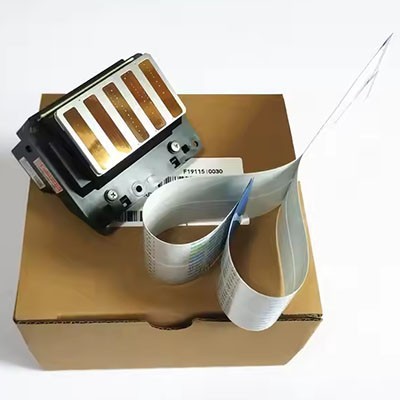
In the high-volume environment of professional photo labs and commercial print facilities, the Epson Stylus Pro 7890 remains a cornerstone of reliable, gallery-grade output. However, as these workhorses accumulate thousands of hours of operation, print head degradation becomes an inevitable reality. Executing an Epson Stylus Pro 7890 print head replacement is not merely a mechanical repair; it is a critical operational milestone that requires meticulous planning, precise execution, and a deep understanding of the printer's fluid dynamics.
Comprehensive Diagnostic Validation
Before committing to a costly print head replacement, rigorous diagnostic validation is essential. The 7890’s MicroPiezo TFP technology is remarkably resilient, and many perceived head failures are actually the result of severe ink starvation, airlocks in the dampers, or a saturated maintenance tank. Technicians must first perform exhaustive power cleaning cycles and manual flushes. Only when these interventions consistently fail to resolve persistent banding, cross-channel ink mixing, or physical nozzle plate damage should a replacement be initiated. Misdiagnosing a clogged damper as a failed head can lead to unnecessary capital expenditure.
Precision Fluidics and System Priming
The physical installation of the print head is only one facet of the replacement procedure. The Epson Stylus Pro 7890 utilizes a complex ink delivery system that must be meticulously re-primed. When the old head is removed, the internal fluid pathways are exposed to air. Technicians must employ specialized syringes and vacuum tools to draw fresh ink through the dampers and into the new head’s micro-channels. Failure to completely purge the system of airlocks will result in immediate nozzle failures and can cause the piezoelectric elements to overheat and fail prematurely due to a lack of internal cooling.
Post-Installation Calibration and Alignment
A newly installed print head will not produce optimal output straight out of the box. The replacement process mandates a series of automated and manual calibrations. The printer must execute multiple heavy cleaning cycles to establish proper ink flow, followed by precise head alignment procedures. Utilizing the 7890’s automated optical sensors, technicians must run both bi-directional and uni-directional alignment patterns. This step is non-negotiable; even microscopic misalignments will manifest as visible banding or color fringing, completely negating the benefits of the new hardware.
Contact:Jason
Phone:+86 13764703359
E-mail:jason86ni@gmail.com
Add:No. 80, Building 10, Jiangdong Street, Yiwu City, Zhejiang Province

 Español
 русский
 Português
 Deutsch